 Relay Publish
The short answer
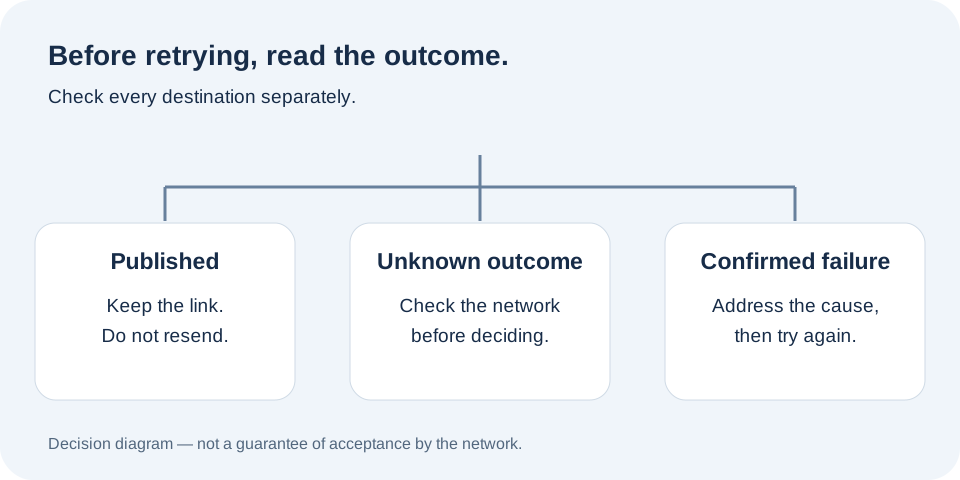
Before retrying, separate a confirmed failure from an unknown outcome. Check tracking and the destination account. Do not resend to networks that already published, and keep one stable reference for the video.
1. Identify the same content before taking action
Record the title, source account and intended destination. Two videos with the same name are not necessarily the same file: you may have exported a revised version or selected another draft. Keep a stable reference so two different uploads do not become one confusing incident.
For a series, use a working reference such as cycling-tip-03. It helps you find the video and its history; it does not need to become a technical code in the public title. Keep the original link and the exact destination account name alongside it.
2. Do not mistake waiting for failure
A closed screen, interrupted mobile connection or long loading state does not prove that the network rejected your content. The server may have received the file before the interruption. Refresh tracking and check the last confirmed stage rather than immediately creating another publication.
YouTube distinguishes receiving a file, processing it and its privacy status. Those details do not explain every incident, but they show why an accepted transfer and a public video require different checks. An unknown outcome calls for investigation first, not a second copy of the same video.
3. Check destinations individually
Open the correct account, Page or channel. Find the recent video and compare its content, time and caption. Use the final link in tracking when one is available. A visible Facebook publication does not tell you whether YouTube has finished processing its version.
Facebook has a confirmed link; YouTube is still processing. Keep the successful Facebook post. Check YouTube without uploading to both networks again.
If you manage several clients, perform this check in the relevant workspace. Similar Page names can make a video appear missing when you are simply looking in the wrong account.
4. Retry only an identified failure
Read the reason before retrying. An expired permission needs reconnection, a rejected file needs correction, and content awaiting approval needs a decision. Repeating the same action without addressing the cause will not solve the issue and makes the upload history harder to understand.
If the outcome remains uncertain, check the network again or contact support with the upload reference. Do not tell a client that a video is live simply because you pressed publish. The guide to a detected but unpublished video helps identify the stage that still needs attention.
5. Finish with a small verification routine
For each destination, keep its outcome, available link and verification time. You do not need a complex spreadsheet: three lines with the account names can show what is finished and what needs action. Do not delete a successful publication simply because another destination has an incident.
Relay groups tracking by network so you do not have to treat every upload as one global result. Explore how it works and choose an approval mode that fits your content. The public app is in preparation. Join the waitlist to discover a clearer workflow, without a promise that every network can publish without failure.
Put this into practice with Relay
Choose an authorized Instagram source, your destinations and whether to approve each video before publishing. Check compatibility before joining: the public iPhone app is in preparation.
Before you move on
- Identify the same video and correct destination.
- Separate unknown outcomes from confirmed failures.
- Keep successful posts and existing links.
- Address the cause before trying again.
Official references
Platform rules can change. Check these sources for eligibility and technical constraints.
Practical guidance, not a promise of reach. Examples are illustrative. The Relay Publish public app is in preparation; platform access and permissions remain required.